
How to Set up Paid Search on Google and Bing for SaaS Companies
A practical setup guide for building a clean search account structure (brand vs. competitor vs. category), choosing match types intelligently, avoiding the common settings that waste spend, and expanding winning Google campaigns into Bing without doubling your workload.

Paid search is one of those channels that looks simple from the outside (“just bid on some keywords!”) and then gets expensive fast if you don’t structure it correctly.The way we run it for B2B SaaS companies is pretty consistent: use search to capture existing intent (people already looking), while your outbound + matched audiences + retargeting create intent over time. That’s the balance. And at the campaign level, we keep it boring on purpose. Boring is scalable.
Start with the 3 campaign buckets (don’t overcomplicate it)
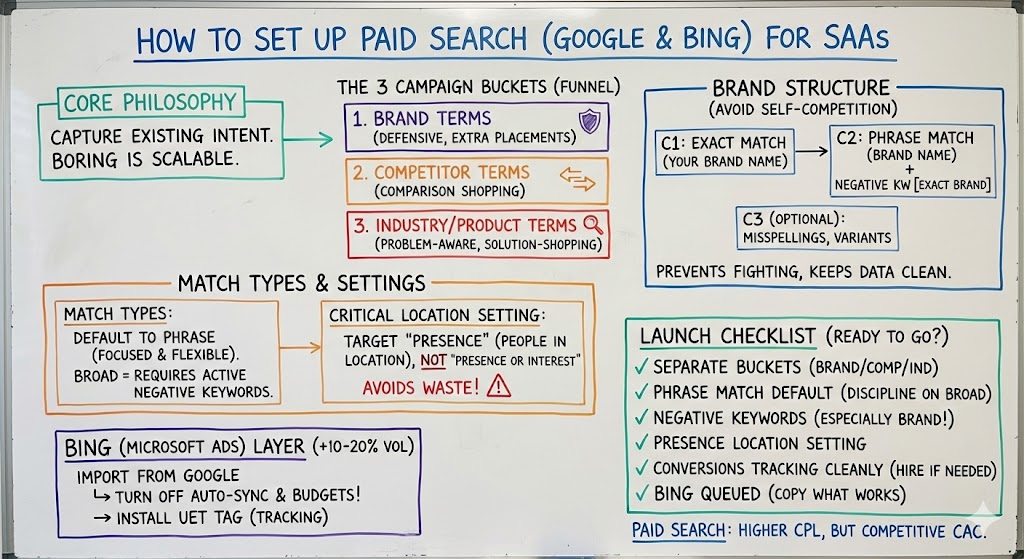
When we set up search for clients, we usually start with three categories of campaigns: brand terms, competitor terms, and industry/product terms.
Brand terms matter even if you rank #1 organically. Why? Two reasons: (1) Google gives you extra ad placements beyond the standard organic results, and (2) competitors often bid on your name (or will later). Defensive brand search is cheap insurance.
Competitor terms are your “comparison shopping” capture layer.
Industry/product terms are your “problem-aware, solution-shopping” layer.
If you do just those three well, you’re already ahead of most teams.
Brand search structure that avoids self-competition
If you have meaningful brand search volume (say, thousands of searches/month), a clean way to structure brand search is to segment it so you can bid intelligently and avoid campaigns fighting each other.
A proven setup:
- Campaign 1: Exact match for your exact brand name
- Campaign 2: Phrase match for your brand name, but add a negative keyword for the exact-match brand term (so the phrase campaign doesn’t steal traffic from the exact campaign)
- Campaign 3 (optional): common misspellings, “brand + .com”, close variants
.jpg)
That negative keyword step is the difference between “clean data” and “why are these two campaigns competing and messing up my CPL?”
Match types: why we usually start with phrase match (and are cautious with broad)
For most non-brand campaigns, we typically recommend phrase match because it stays focused while still giving you some flexibility. Broad match can get messy fast and create a massive stream of irrelevant search terms unless you actively manage it.
If you do use broad match, you need a real operating rhythm:
- review Search Terms frequently (keywords ≠ search terms)
- add negatives aggressively for irrelevant queries
Broad match can find new volume you didn’t think of, but it’s not “set and forget.”
.jpg)
Don’t miss this Google location setting (it’s painfully easy to waste money)
If you target specific countries, Google’s default can quietly expand your targeting to people who show “interest” in that geography, even if they don’t live there. For B2B SaaS, you almost always want Presence (people in your target locations), not “Presence or interest.”
This one setting can be the difference between a clean funnel and a bunch of junk leads.
Bidding: keep it simple at the beginning
If you’re new (no conversion history), start by optimizing for Max Conversions and collect clean data. For brand campaigns specifically, you can use Target Impression Share (for example, targeting ~80–85% impression share) if you want to ensure you show up when people search you—but we reserve that approach for brand.
Also, in many cases we turn off Google’s extra expansion settings early on so we’re buying the most relevant inventory first.
Measurement: get conversion tracking done—even if you hire it out
This is where founders lose weekends.
If you’re spending hours fighting pixels, tags, and conversion tracking, it’s often smarter to pay an experienced contractor and move on. Conversion tracking might take a couple hours, but it shouldn’t take ten.
And once you’re running multiple channels, you’ll want clean cross-platform reporting so your CAC math doesn’t get distorted by each platform trying to take credit.
Bing (Microsoft Ads): the underrated “+10–20% volume” layer
Once Google is working, Bing is often worth adding.
We frequently see Bing drive an additional ~10–20% of Google’s search volume at a low CAC when you replicate what’s already working.
.jpg)
Two practical notes:
- Import campaigns from Google into Microsoft Ads. It’s surprisingly seamless, and it means you don’t have to “learn twice.”
- When importing, turn off auto-sync (and especially don’t sync budgets). Otherwise you can accidentally mirror Google budgets into Bing and overspend.
Also make sure your UET tag (Microsoft’s pixel) is installed so conversion tracking works properly.
A simple “launch checklist” (the one I’d actually use)
Before you hit go, make sure:
- brand / competitor / industry campaigns are separated
- phrase match is your default (broad only with discipline)
- negative keywords prevent overlap (especially in brand structure)
- locations are set to Presence
- conversions are tracking cleanly (even if you hire help)
- Bing is queued up as the “copy what works” layer
One final point: paid search often has a higher CPL, but it can convert into customers well—so CAC can still be very competitive.