
How to Set up LinkedIn Thought Leader Ads for SaaS Companies
A step-by-step walkthrough of running thought leader ads the right way—boosting founder/executive content to your ICP, using matched audiences, and turning LinkedIn into a consistent awareness engine that makes outbound and sales conversations easier.

If you’re selling B2B SaaS, LinkedIn is where reputation gets built—quietly, over time, through repeated exposure. Thought leader ads (aka boosted posts) are one of the cleanest ways to “blanket” your ICP with your message without looking like you’re running ads… because the ad is content.
What thought leader ads actually are (and why they work)
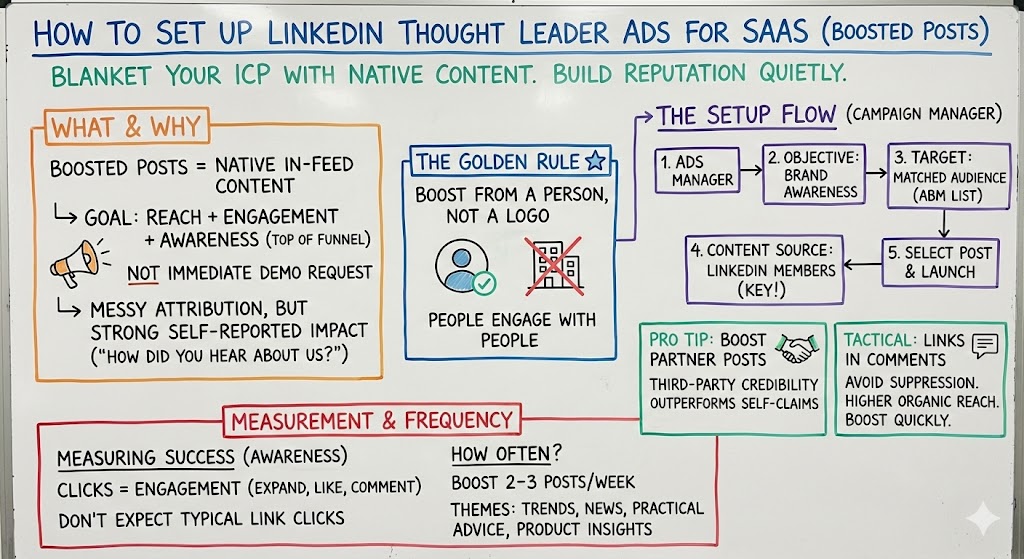
A thought leader ad is essentially a boosted post that shows up as native content in-feed. The goal is reach + engagement + awareness at the top of the funnel—not an immediate demo request.
.jpg)
We’ve used this approach to generate ~4.9M LinkedIn content impressions and 20k+ engagements over a year, reaching ~900k members with relatively modest spend compared to what most people assume you need.
And interestingly, because there’s often no link, attribution is messy. But self-reported “How did you hear about us?” data frequently points back to LinkedIn even when click-based tracking can’t.
Always boost from a person, not a logo
This is one of those things that feels obvious after you’ve wasted money doing it wrong.
LinkedIn is a social network. People engage with people, not company pages—unless your company is one of a tiny number of household names. If you want posts to get liked, saved, and shared, boost from a founder, exec, or recognizable voice in your niche.
The setup: how to launch a thought leader ad in LinkedIn Campaign Manager
.jpg)
At a high level, the flow is:
- Go to LinkedIn Ads Manager
- Choose the Brand Awareness objective
- Target your Matched Audience (your uploaded ABM list), optionally layered with filters
- In the ad step, click Browse existing content
- Choose the content source: LinkedIn Members (this is the key part for thought leader ads)
- Select the post and add it to the campaign
That’s basically it. The “magic” is upstream: great content + the right audience list.
Boost partner posts for instant third-party credibility
One of my favorite plays: get an affiliate, partner, or happy customer to post something positive about you, then ask for permission to boost it.
When someone says “I’m in X program / I use Y product and it’s working,” that third-party framing often outperforms your own claims. And the person usually says yes because it gives them more exposure too.
A tactical detail that matters: links in comments, not in the post
If you include a link in the body of a LinkedIn post, reach often gets suppressed. A practical workaround: no link in the post, put the link in the first comment. We regularly see materially higher reach that way.
Also: boost quickly. The paid engagement can create a halo effect that helps organic distribution too.
Measuring thought leader ads (without fooling yourself)
One confusing detail: when there’s no link in the post, “engagement” actions can show up as clicks in reporting—because people are clicking to expand, like, comment, etc.
So don’t panic if your “clicks” don’t look like typical link clicks. This is awareness inventory.
.jpg)
How often should you run these?
We typically boost 2–3 posts per week once the system is running. The content themes that tend to perform: trends in your industry, news, practical advice, and occasionally product-related insights (without turning every post into a pitch).