
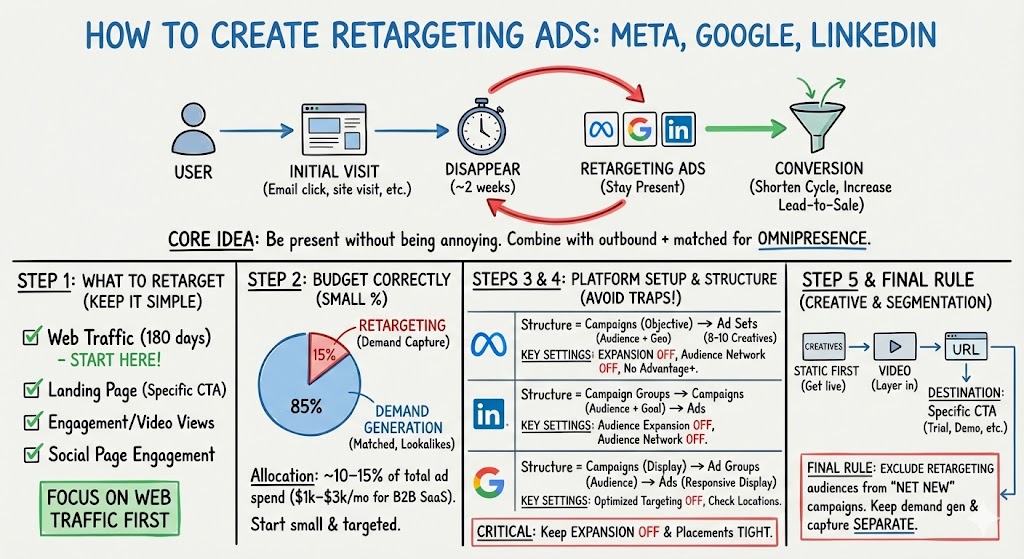
How to Create Retargeting Ads on Meta, Google, and LinkedIn
If someone clicks your cold email, visits your site, watches a bit of a video, or lands on a case study page… and then disappears for two weeks (which is normal in B2B), retargeting is how you stay present without being annoying. It shortens the sales cycle, improves visitor-to-lead conversion, and increases lead-to-sale conversion—usually at a relatively low cost compared to “net new” acquisition.

And when you combine retargeting with outbound + matched audience ads, you get the real magic: brand omnipresence inside your ICP.
Step 1: Decide what you’re retargeting (and keep it simple at first)
There are a bunch of “types” of retargeting you can do, but the simplest (and what we focus on first) is all website visitor retargeting.
The core set of options usually looks like:
- Web traffic retargeting (commonly 180 days)
- Landing page retargeting (people who hit a specific CTA page)
- Engagement / video view retargeting (people who watched content)
- Social page engagement retargeting
If you’re getting started, just do web traffic retargeting for 180 days, and then later you can segment further once you have enough traffic volume.
Step 2: Budget it correctly (retargeting should not eat your whole budget)
Retargeting is incredibly valuable—but it’s also easy to overspend on if you don’t keep it in its lane.
A simple way to think about budget allocation is to split your ad program into two buckets:
- Demand Generation (matched audiences, lookalikes, thought leader, etc.)
- Demand Capture (paid search + retargeting)
In the slide deck, retargeting is shown as 20% of the total mix inside demand capture.
Separately, there’s also guidance that most teams only need ~10–15% of total ad spend for retargeting for it to be effective—often $1k–$3k/month for B2B SaaS.
So the practical takeaway: start small, get it live, and make sure it’s clean and targeted before you scale it.
[Insert Slide #556 from Program Slides here]
[Insert Slide #562 from Program Slides here]
Step 3: Set up your retargeting audiences (Meta, LinkedIn, Google)
Before the ads can run, each platform needs a retargeting audience (built from your pixel traffic).
If you’re doing this “the SaasRise way,” the priority is: get the audiences created, then run simple campaigns to those audiences.
Here are the slide references for the three main setups:
- Google retargeting audience setup in Google Ads + GA4
Step 4: Build campaigns the right way (and avoid the common traps)
Retargeting campaigns fail for boring reasons—not strategy reasons.
It’s usually settings. Things like:
- “Audience expansion” toggled on
- Off-platform placement networks turned on
- Geography accidentally widened beyond your TAM
- Google optimized targeting expanding outside your audience
- Meta “Reach people beyond your custom audience…” enabled
The deck calls this out directly: keep expansion OFF unless you intentionally want to broaden, keep placements tight, and only target TAM geos.
.jpg)
Now let’s translate this into what you actually do inside each platform.
Meta: Retargeting campaign structure + settings to watch
On Meta, the structure we use is simple:
- Campaigns = objective (ex: “Web Traffic Retargeting Conversion”)
- Ad Sets = the specific audience (your retargeting audience + geo constraints)
- Ads = your creatives (keep it organized; don’t run 50 ads in one ad set—cap it around 8–10 live creatives)
This is straight from the slide deck.
And the key Meta setting: make sure you’re not using Advantage+ audiences, and that you don’t have “Reach people beyond your custom audience…” turned on. Also, limit Audience Network placements.
LinkedIn: Campaign structure + the two clicks that matter
LinkedIn is similar, just with different naming:
- Campaign Groups = objective (ex: “Web Traffic Retargeting Conversion”)
- Campaigns = your audience + goal
- Ads = creatives (again, keep it tidy)
Most of the important settings are at the campaign level. Select the retargeting audience, exclude who you want, then make sure Audience Expansion is off and LinkedIn Audience Network is off.
Google: Display retargeting that stays true retargeting (no “helpful” expansion)
For Google, we focus on Display for retargeting (you can also use Performance Max, but Display is the cleaner starting point).
Structure:
- Campaigns = objective + campaign type (Display)
- Ad Groups = the specific retargeting audience
- Ads = your responsive display assets / creative set
The most important setting here—especially for retargeting—is: Optimized Targeting OFF.
Audience selection can happen in Ad Group settings or the Audiences tab, and you’ll also want to sanity-check your Locations settings so you’re only serving inside your intended regions.
One more very practical Google note from the transcript: when you’re building display assets, it helps to upload a lot of images (Google will ask for multiple formats), and videos pull from an existing YouTube account.
Step 5: Launch creatives (static first, then video)
Once targeting and structure are correct, creative becomes the lever.
The “homework” approach is exactly right: get static ads live first, then layer in video.
Also—don’t overcomplicate the destination URL at the beginning. You can send retargeting traffic to your homepage, but it’s often better to send to a specific landing page CTA (trial, demo, webinar, free report, case study, etc.).
The final retargeting rule that makes everything work together
If you’re running matched audiences and lookalikes too, you want to keep your segmentation clean:
Retargeting audiences should be excluded from your “net new” campaigns, so you don’t waste money showing the same people extra impressions in the wrong bucket.
That one habit keeps your demand gen and demand capture programs from stepping on each other.