
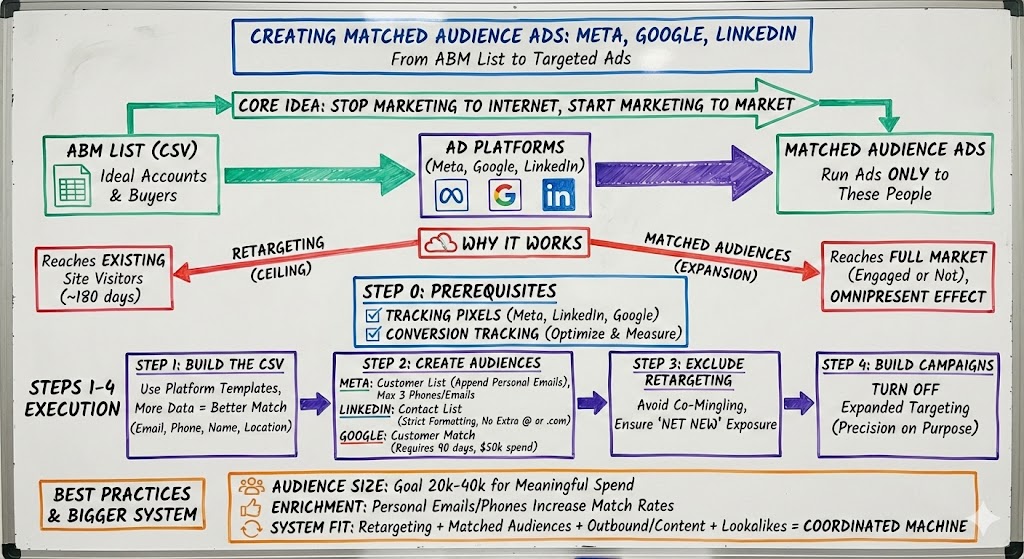
How to Create Matched Audience Ads on Meta, Google, and LinkedIn
Matched audience ads are one of those tactics that sounds more complicated than it is — until you realize it’s basically just this: Take your ABM list (your CSV of ideal accounts and buyers), upload it into the ad platforms, and then run ads only to those people. That’s it.

Once you do it, you stop “marketing to the internet” and start marketing to your market.
In week 11 of the B2B SaaS Growth Program, David and I walked through exactly how to set up matched audience ads (plus lookalikes) across Meta, LinkedIn, and Google — and more importantly, how to avoid the mistakes that waste budget and muddy results.
Why Matched Audiences Work (and Why We Teach Them Right After Retargeting)
We start with retargeting because it’s the fastest way to become omnipresent to people who already visited your site. The simple goal is: if someone touches your brand, they should see you repeatedly for the next ~180 days.
But retargeting alone has a ceiling. It can’t reach the full market — only the people who already found you.
Matched audiences solve that.
They let you advertise to everyone you want to sell to, whether they’ve engaged yet or not. And when you run matched audiences alongside outbound + content, your brand starts showing up everywhere your ICP lives.
That’s how you get the “I feel like I’ve seen you everywhere” effect — without broad targeting or hoping an algorithm guesses correctly.
Step 0: What You Need Before You Upload Anything
Before you create a matched audience on any platform, make sure you’ve already done the two foundational prerequisites:
- Tracking pixels installed (Meta pixel, LinkedIn Insight Tag, Google tag)
- Conversion tracking configured (so you can optimize and measure properly)
This came up repeatedly because founders often try to jump straight to audiences before the underlying tracking layer is working.
Step 1: Build the CSV the Platforms Actually Want
This is where most people get stuck.
Matched audiences feel hard mainly because platforms are picky about CSV formatting — both column headers and data formats.
The highest-leverage move: download each platform’s template CSV and format your list to match it.
David’s guidance was consistent across all three:
- The more data points you provide per person, the higher your match rate
- Email is the anchor identifier everywhere
- Phone + name + location fields can materially improve match rate (especially on Meta)
- Every platform has its own quirks — treat the templates as the source of truth
The data fields that tend to drive the best match rates
On Meta specifically, the strongest fields are: email, phone, first/last name, city/state/zip/country — and Meta allows up to three emails and three phone numbers per contact, which is surprisingly helpful when you have multiple records.
Step 2: Create Matched Audiences on Each Platform
Meta (Facebook + Instagram)
In Meta, you’ll do this inside Audience Manager.
For retargeting, your source is Website (pixel-based).
For matched audiences, your source is Customer List — and yes, the label is misleading. It can be customers or prospects. It’s really just “upload a list of people.”
The key workflow is:
- Go to Audiences
- Create Audience → Custom Audience
- Choose Customer List
- Download their template CSV the first time
- Upload your ABM list
Meta gotcha: phone numbers must be formatted in one of Meta’s accepted formats or they won’t match properly.
.jpg)
Meta match-rate tip: append personal emails
Ryan called out a very pragmatic lever: if you enrich your ABM list with personal emails, match rates on Meta often jump from ~25% to ~50%. The tradeoff is cost — roughly ~$0.05 per record via enrichment tools like Clay — which makes it more worth it for higher-ACV businesses.
LinkedIn is similar, but stricter in one very specific way.
You’ll create an audience, choose Contact List, upload the CSV, and you’re set.
LinkedIn gotcha: do not allow anything that looks like an email (an “@” or “.com”) outside the email column. This is a common reason uploads fail.
LinkedIn also supports Company match lists and Contact match lists. If you have actual people (name + email), do contact lists. If all you have is companies, you can upload companies and layer job titles in targeting.
.jpg)
Google (Customer Match)
Google’s workflow is straightforward mechanically (Audience Manager → Segments → Customer List upload), but Google has the biggest eligibility constraint:
Your Google Ads account must be at least 90 days old and have at least $50,000 lifetime spend to use uploaded Customer Match audiences.
If you’re below that threshold, you can still run:
- Google Search
- Google Display retargeting (website-based audiences)
- Other web traffic–based segments
…but you can’t upload your ABM list as a customer match audience yet.
.jpg)
Google audience-size confusion (very common)
David mentioned a pattern he sees every cohort: Google might say it “matched” a large percentage of your list, but your servable audience size shows much smaller. That’s often because many Google accounts are inactive — Google can recognize the account, but it can’t necessarily reach it with impressions because the person isn’t actively logged in.
Step 3: The Biggest Mistake to Avoid — Co-Mingling Audiences
This is the part that quietly wrecks results if you skip it.
When you run matched audience campaigns (or lookalikes), you want those to be “net new” exposure — not just more impressions to the same retargeting pool.
So you should exclude your retargeting audiences from your matched audience campaigns.
Every platform supports exclusion, and the targeting/exclusion boxes are usually right next to each other.
The good news: you don’t have to “manage lists.” Retargeting audiences update dynamically as people visit your site. As long as you exclude retargeting in your matched audience campaigns, the system stays clean automatically.
.jpg)
Step 4: Build the Campaigns the Right Way (So the Platforms Don’t “Help” You)
A theme that came up on Meta and LinkedIn: the platforms now default to expanded targeting modes (Meta’s Advantage+ especially).
For matched audiences and retargeting, you usually do not want expanded targeting on. You’re being precise on purpose.
If you ever find yourself saying, “Why isn’t it only targeting my uploaded list?” this is often the reason.
Step 5: How Big Should Your Matched Audience Be?
Ryan answered this in a way I really like because it’s practical:
If you only match a few thousand people, you’ll saturate the audience quickly and you won’t be able to spend meaningfully. Ideally, you want something more like 20k–40k matched people (unless your ACV is so high that a few customers move the needle).
That’s one reason enrichment (personal emails, phone numbers) can be worth it: it expands the reachable audience.
Where This Fits in the Bigger System
Matched audiences are not “the ads strategy.”
They’re a layer in a broader system:
- Retargeting keeps you omnipresent to known traffic
- Matched audiences expand presence across your whole ICP
- Outbound and content create engagement signals and nurture
- Lookalikes (especially on Meta) can then expand beyond your list once you’ve built conversion data
When these run together, you stop relying on a single channel to “work.” You create a coordinated machine where each channel makes the other ones cheaper and more effective.
And that’s where profitable scale starts showing up.