
How to Create Lookalike Ads on Meta, Google, and LinkedIn
At a high level, lookalike ads are how you get your message in front of new people who resemble the people who already convert for you.

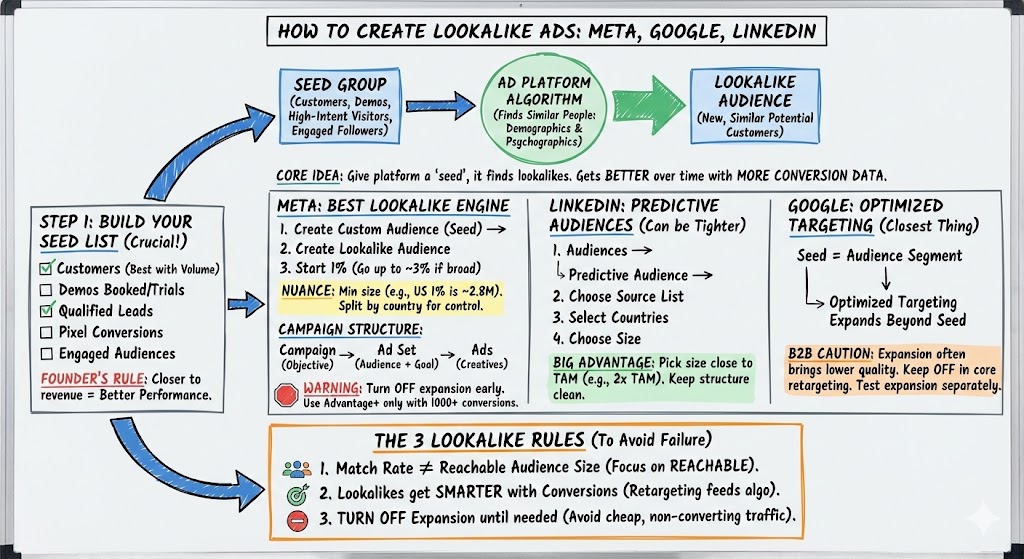
The best way to think about it is: you bring the ad platform a “seed” group (customers, demo requests, high-intent site visitors, engaged followers, etc.), and the platform tries to find more people who look similar—demographically and psychographically—to that seed.
And here’s the key: lookalikes almost always get better over time because the algorithm gets smarter as you feed it more conversion data. Retargeting + matched audiences create the initial conversion signals, and lookalikes become the “expansion layer” once you’ve got momentum.
Step 1: Build your seed list (the part everyone rushes)
Before you touch Meta, LinkedIn, or Google settings, you need to decide what you want the algorithm to “copy.”
Your seed list can be:
- Customers (best if you have enough volume)
- Demos booked / trials started
- Qualified leads (not just any form fill)
- Pixel conversions (lead event, trial event, etc.)
- Engaged audiences (page engagers, ad clickers, etc.)
A founder-style rule of thumb: the closer the seed is to revenue, the better the lookalike tends to perform.
Meta: The best lookalike engine (and how to set it up cleanly)
Meta is usually the strongest platform for lookalikes because they have so many data points on users, so the “similarity matching” is just… better.
.jpg)
The Meta workflow
- Create a Custom Audience first (your seed)
- Create a Lookalike Audience from that Custom Audience
- Start with 1%, and only go broader (up to ~3%) if your market is genuinely broad.
One nuance most people miss: Meta lookalikes have a minimum size based on the country. For example, in the US the smallest 1% lookalike is ~2.8M people, so even when you think you’re “tight,” Meta is still fairly broad.
That’s why it can be smart (when you have enough data) to split by country—US lookalike, Canada lookalike, UK lookalike—so you can control quality and messaging region by region.
Campaign structure (so you don’t end up with spaghetti)
The way we like to structure Meta is:
- Campaign = objective (ex: “Lookalike Brand Awareness”)
- Ad Set = audience + goal (ex: “Lookalike Conversion – 1% LAL USA Only”)
- Ads = creatives, numbered for organization (don’t run 50 in one ad set—keep it to ~8–10 live).
.jpg)
A warning: don’t let Meta “help” you too early
For early-stage or low-conversion accounts, you generally want to turn off anything that expands beyond your chosen audience (because it often drives low-quality traffic).
[Insert Slide #576 from Program Slides here]
When to use Advantage+ (Meta’s newer expansion engine)
Advantage+ can work really well—but typically only once you have a lot of conversion data. In the slides, we’ve seen the best results when an account has ~1000+ conversions and the tracking is set up correctly.
And if you want the quickest “how-to” reference for Meta lookalikes:
.jpg)
LinkedIn: Lookalikes = “Predictive Audiences” (and they can be tighter than Meta)
On LinkedIn, the lookalike equivalent is called a Predictive Audience.
The LinkedIn workflow
- Go to Audiences → Create Audience → Predictive Audience
- Choose your source list (contact list, company list, retargeting audience, conversion audience, lead gen form audience, etc.)
- Select your countries
- Choose your size
One big advantage: you can pick the size you want, which lets you keep the audience closer to your real TAM than you can on Meta.
A practical starting point: 2x your TAM size (so if your “sellable universe” is ~100k people, start around ~200k). You can always expand later.
And just like Meta: keep your campaign structure clean and don’t let LinkedIn expand you into junk inventory.
.jpg)
Google: “Lookalikes” don’t exist anymore (here’s the closest thing)
Google used to have lookalikes, but now it’s basically been replaced by Optimized Targeting (set at the ad group level).
Here’s how to think about it:
- Your seed is still an audience segment (retargeting list, matched audience list, etc.)
- Optimized Targeting expands beyond that seed to find “similar” users
- In B2B, this expansion often brings lower-quality traffic, so use it carefully.
If you’re doing classic retargeting, we usually keep Optimized Targeting OFF in the core retargeting campaigns.
If you want to test expansion, do it as a separate campaign/ad group so you can see the incremental lift without polluting your baseline retargeting results.
The three lookalike rules that keep performance from falling apart
- Match rate is not the same as reachable audience size. Especially on Google—an account might match, but the user may not be active/logged in where ads actually serve. Focus on audience size you can reach, not just match %.
- Lookalikes work better after you’ve collected conversions. Retargeting + matched audiences feed the algorithm; lookalikes get smarter as conversion signals build.
- Turn off “expansion” settings until you have a reason to use them. Expansion is tempting. It’s also one of the fastest ways to buy cheap clicks that never turn into pipeline.